Request
A guest sends a request for your show. Open it for free, charge a minimum, or let a free request carry an optional tip.
Free or paid · Approval requiredBuilt for every kind of live
BeatRequest is the QR tipping and audience request app for DJs, live musicians and streamers. Guests join in their browser; you choose tips, dedications and requests.
DJsLive musiciansStreamersGamersLive creators
Available now on iPhone and Android. Guests never need an app. No monthly subscription. Payments are temporarily paused.
One product · many live formats
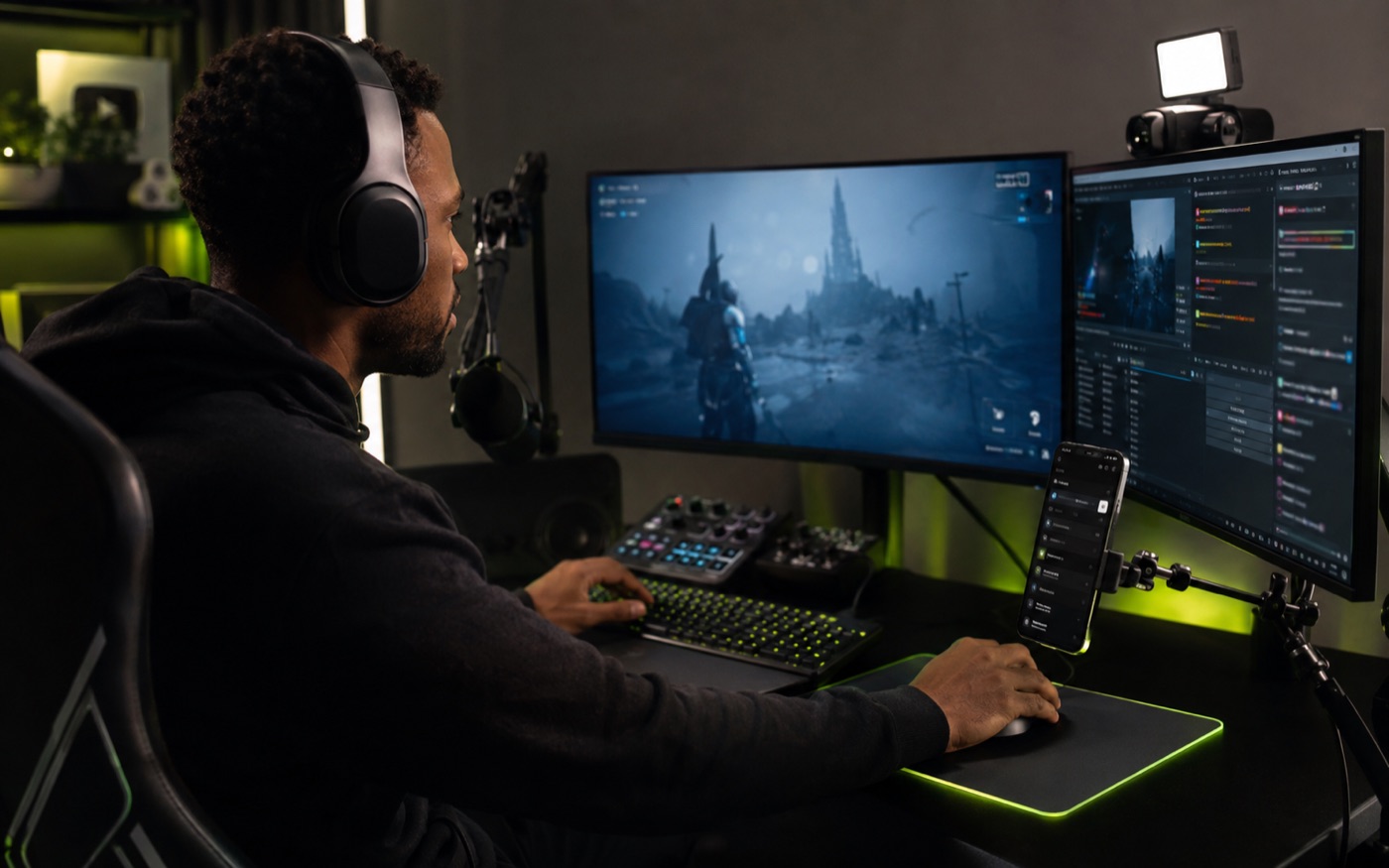
From street sets and bar gigs to livestreams. Open the interactions that fit your show: tips, dedications, or requests.


Three ways to take part
Turn each option on or off at any time. Requests and dedications can be free or paid; tips use the minimum you choose.
A guest sends a request for your show. Open it for free, charge a minimum, or let a free request carry an optional tip.
Free or paid · Approval requiredA guest sends a message or shout-out. Offer it free or paid, then approve it before it enters the live queue.
Free or paid · Approval requiredA guest sends a simple thank-you with no request, message, or performance promise attached.
Charged immediately · No approval requiredHow it works
Guests use their phone browser — nothing to install and no account to create.
Print it, place it on a screen or stream overlay, or share your personal link in chat.
Guests see only the options you opened. Free requests skip checkout; paid requests and tips show clear payment timing.
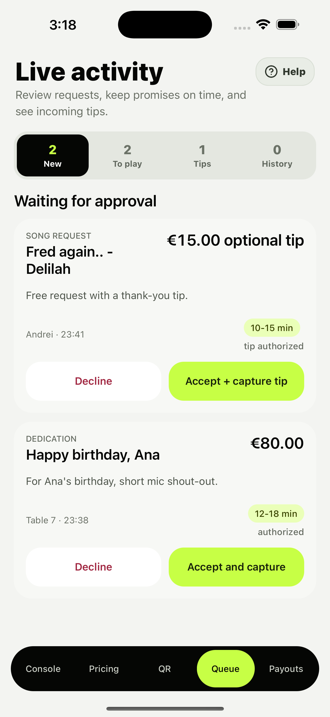
Accept or decline requests in the app. A tip attached to a free request is charged only when you accept that request.
One permanent QR
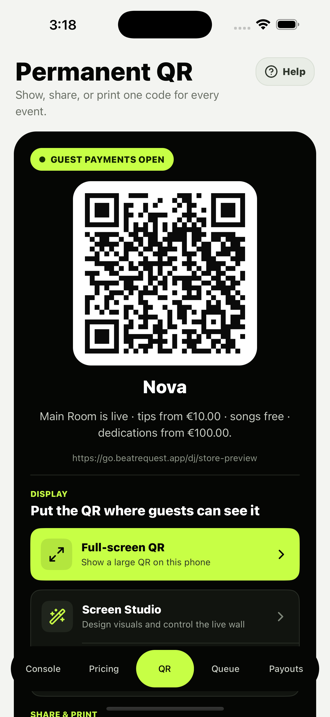
In a venue or online, the same permanent QR and personal link follow every new live event. Show the code on screen, or share the link where viewers can tap it directly.
Print itPosters & table cards
Show itPhones, tablets & screens
The live creator app
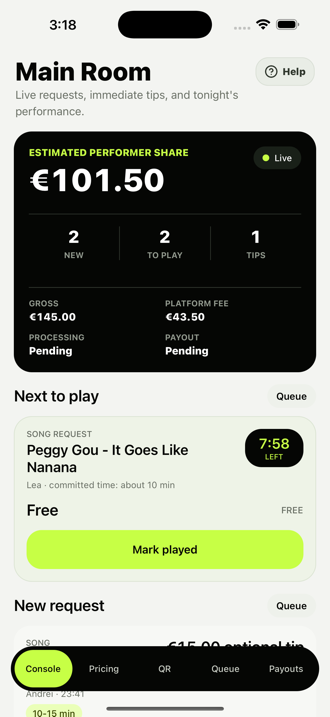
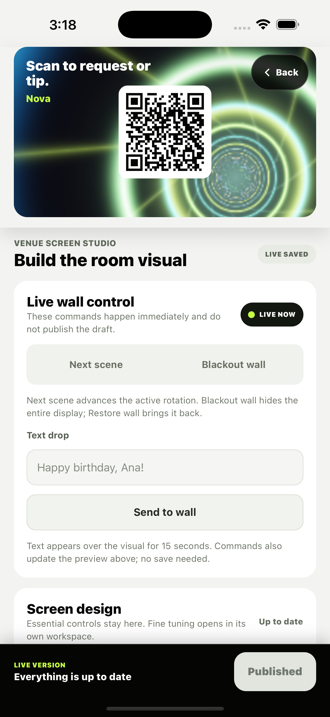
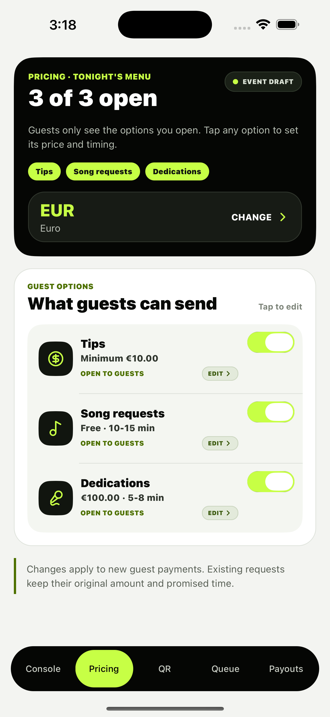
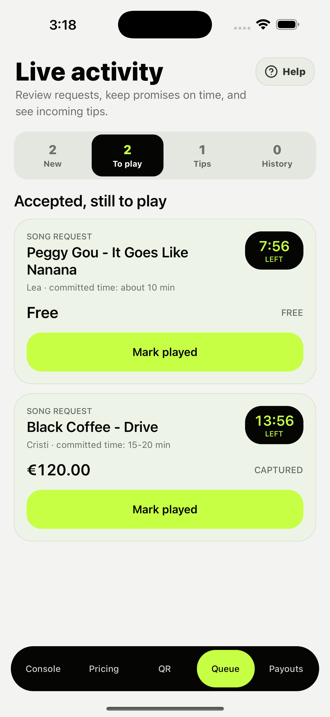
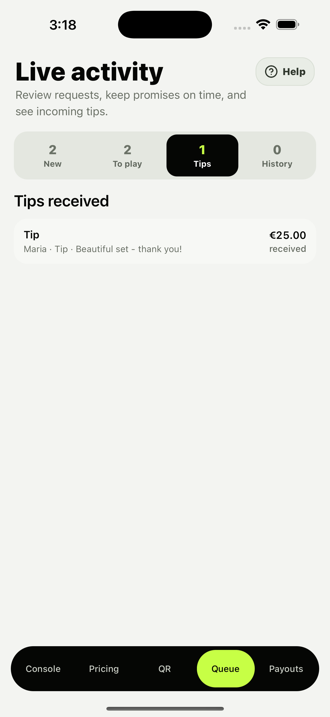
Run the event, review incoming requests, track accepted items, and shape the Visual Wall. These sample app screens include paid features that remain paused while creator payment setup is updated.
For DJs, musicians, streamers, and gamers
Turn tips, dedications, and requests on or off, choose what is free or paid, and keep audience activity organized without interrupting the set, show, or stream.
Free and paid requests arrive with the viewer's or guest's note, payment state, and promised wait window. Tips stay easy to scan separately.
Use tips only, add dedications, or open requests too. Choose free or paid options and set the minimum that fits your live format.
Share it once. Every new event opens behind the same personal link.
In the planned paid flow, guests pay your connected Stripe account. BeatRequest receives a 30% platform fee, and you pay Stripe processing fees. Paid features remain paused during verification.
Know when an authorized request lands, even while the phone is pocketed.
Set the expectation guests see, then track every accepted request against it.
Built for wherever you go live
Paid currency options are being verified for the new creator-account payment setup. When payments reopen, eligible choices will depend on the creator's Stripe account, location and payment methods.
We will show eligible choices before a creator enables a paid event.
The planned flow locks the selected currency for an event before guests pay.
When paid activity reopens, the planned fee is 30% of captured payments. Stripe processing fees are paid by the creator.
Download the BeatRequest app on the App Store or Google Play. Viewers and guests join in their browser with no download or account.
For guests
The live page runs in the browser. Viewers and guests choose from the options the creator has opened, with clear payment timing before they confirm.
Payment timing
Paid checkout is temporarily paused. The planned flow distinguishes free requests, accepted paid requests and direct tips before a guest confirms.
Free requests and dedications need no card or wallet details.
When available, a temporary hold is created, then captured only if the performer accepts.
When available, a standalone tip is charged on confirmation and does not need performer approval.
When payments reopen: a tip attached to a free request is charged only if that request is accepted. Declines and expiry cancel uncaptured authorizations; your bank or wallet controls when a hold disappears. Available methods will be shown at checkout. Captured payments remain subject to applicable refund and dispute rules.
Optional large-screen mode
Visual Wall is the high-energy option for clubs, festivals, and bigger rooms. Put the same permanent QR on a TV, projector, or LED wall while 45 live visual scenes move around it. Posters and tablets work just as well for smaller performances.
Open fullscreen demo ↗FAQ
BeatRequest is a live audience participation app. DJs, musicians, streamers and other live creators share one permanent QR code or personal link so guests can send tips, dedications and optional requests. Creators manage the event and requests in the app; guests use their browser without installing an app or creating an account.
No. Street musicians, singers in bars and hotels, streamers and gaming creators can use it too. Open only the options that fit your show, including tips-only sessions. Requests are suggestions you review and choose whether to accept. For music-related requests, this is not automatic music playback or a music-streaming service.
A request, a dedication, or a direct tip. The creator chooses what is open, whether requests are free or paid, and the minimum for each paid option.
No. The QR opens a mobile web page where guests choose a request, dedication, or tip. Free requests need no checkout; paid actions use the browser.
Yes. Keep your permanent QR in a corner of the stream and share the personal link in chat, your description, or your profile. Viewers can leave a tip, send a dedication, or make a request when you have that option open. BeatRequest does not require a Twitch, YouTube, or streaming-platform integration.
No. Your permanent performer QR code and personal link stay the same across events. Start a live event in the app to open the guest options for that session. Reuse the same poster, table card or stream overlay; guests on the same phone can tap your link instead of scanning.
No. Paid requests and tips are temporarily paused while we verify the new creator-account payment flow. Do not rely on checkout until we announce that payments have reopened.
Once paid activity reopens, the planned flow charges paid requests only after acceptance. Free requests need no payment. A direct tip is charged on confirmation; an optional tip attached to a free request is charged only if that request is accepted.
Under the planned paid flow, an uncaptured paid request or attached optional-tip authorization is cancelled if declined. The bank or wallet controls when the hold disappears. A captured payment may still be subject to refund or dispute rules.
There is no monthly subscription. Under the planned paid model, BeatRequest receives 30% of each captured payment as a platform fee. Stripe processing fees are charged separately to the creator, so the creator's net amount is less than 70%. Paid activity is currently paused.
For the new paid flow, guests will pay the creator's connected Stripe account directly. BeatRequest will receive its 30% platform fee; Stripe processing fees will come from the creator's share. Bank payouts will follow that Stripe account's country and schedule settings. This flow is not live yet.
We are verifying eligible currencies for the new creator-account payment flow. The available choices will depend on the creator's Stripe account, country and payment methods. Do not assume a particular currency is supported until it appears in the enabled paid checkout.
Yes — one tap in the app. The QR stops accepting new requests immediately, and anything still pending stays in your queue to accept or decline.
BeatRequest at beatrequest.app is operated by ABOD NEST S.R.L., a Romanian company. Use the support form or email support@beatrequest.app. The current Performer Agreement applies to the services available now. New creator-payment terms will be published before paid features reopen.
Ready when you are
Create your permanent QR and personal link, choose what your audience can do and which currency they see, then manage the live session from the BeatRequest app.
Available now on iPhone and Android.
Product engineering partner
Cluj-Napoca, Romania
BeatRequest's web and mobile software is developed with Start4AI, our product engineering partner.
Product engineering · Web and mobile applications